Android notes
Searching Text, Voice Notes and Photos on the Phone: an EmbeddingGemma 2 Experiment on Android
Search in most note apps works with words. You type "workout", and the app looks for notes that contain the letters w-o-r-k-o-u-t. If you wrote "gym" that day, you get nothing.
It is worse for anything that is not text. A voice note where you say "meeting with Marco on Monday" is invisible to search. So is the photo of the mountains you took on holiday.
This post is the full story of an experiment I ran in Tuttodì, my daily-notes app for Android: could a phone, with no cloud at all, search text, voice notes and photos by what they mean?
The tool was EmbeddingGemma 2, an open model that Google DeepMind released on 6 October 2026. I measured everything on one phone, a Samsung Galaxy S22, and I will explain every step as if you had never heard the word "embedding".
Before we start
This is an experiment, not a feature. It lives in a separate build of the app on a separate branch, and nothing here has shipped to Tuttodì users.
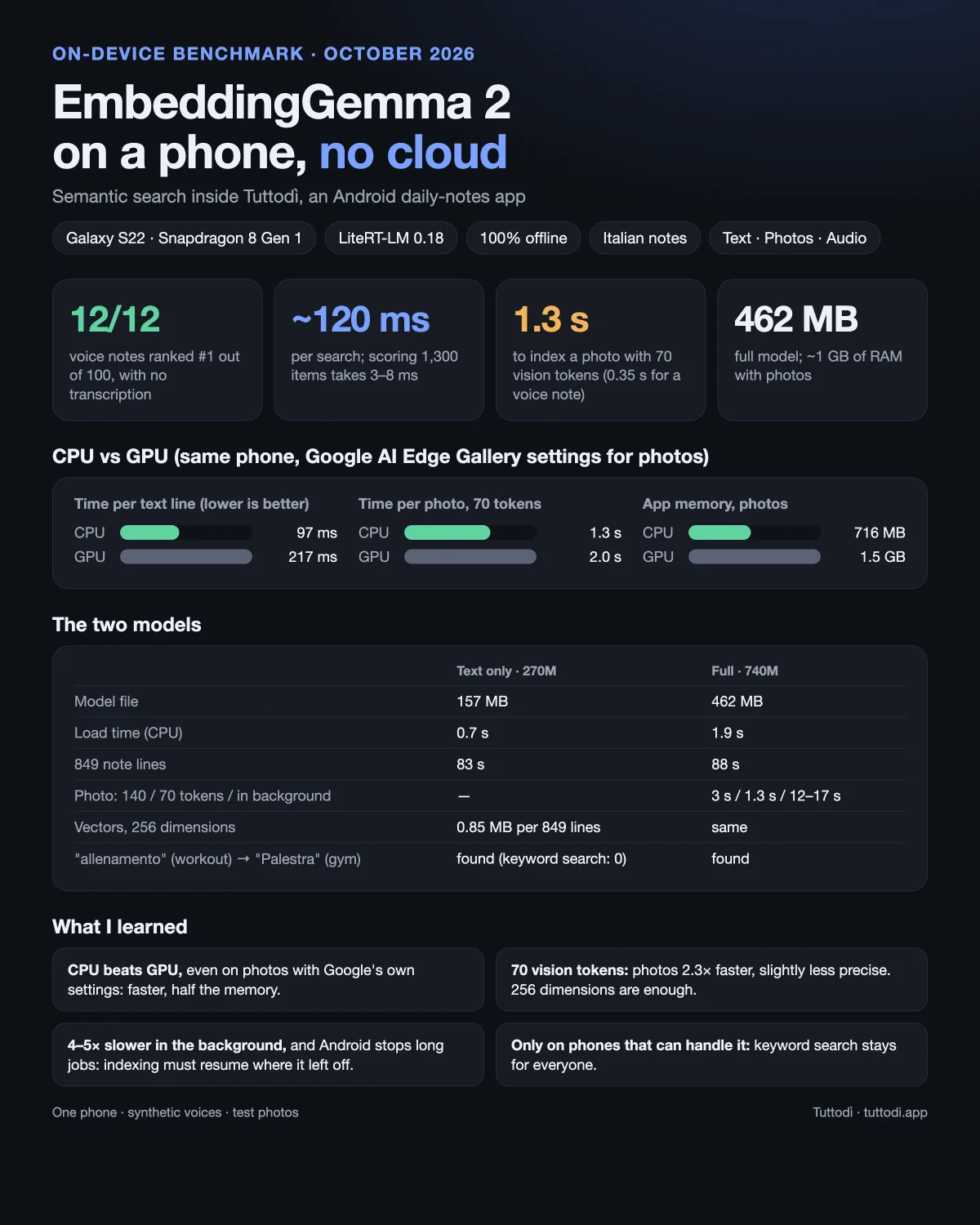
1. The problem with keyword search
Tuttodì stores notes in a local SQLite database and searches them with FTS (Full-Text Search), a feature built into SQLite. FTS is fast and reliable, but it only answers one question: does this note contain these words?
That leaves three gaps:
- Synonyms and paraphrases. "Workout" does not find "gym". "Holiday" does not find "trip".
- Voice notes. A recording is just audio. There are no words in the database to match.
- Photos. Same problem: a picture of a cat on the sofa contains no letters.
The usual fix for the last two is to send the files to a server, which transcribes the audio and labels the photos. Tuttodì's promise is the opposite: everything stays on the phone. So the question became: can the phone do this by itself?
2. Embeddings, explained simply
An embedding model turns a piece of content into a list of numbers. The list always has the same length: for EmbeddingGemma 2, 768 numbers.
The model is trained so that things with a similar meaning get similar numbers. "Workout" and "Gym" end up close together. "Workout" and "Groceries" end up far apart.
A useful picture is a map. Every line of your notes becomes a point on the map. Lines about similar things sit near each other. When you search, your question also becomes a point, and the results are simply the points closest to it.
What makes EmbeddingGemma 2 special is that it is multimodal: it can turn text, images and audio into points on the same map. A photo of the Dolomites lands near the sentence "snowy mountains". A voice note where you say "meeting with Marco" lands near that written sentence.
The words you will meet in this post
- Model: a file (here 157 MB or 462 MB) that contains what the neural network learned. On its own it does nothing; a program has to run it.
- LiteRT-LM: Google's library that runs the model on the phone. Think of it as the engine.
- Embedding or vector: the list of numbers the model returns.
- Similarity: a number between -1 and 1 that says how close two vectors are. Around 0.8 means "these talk about the same thing".
- Indexing: computing the vector of every note line, photo and recording in advance and saving it, so a search does not have to recompute them.
- CPU and GPU: the phone's main processor and its graphics processor. The engine can use either.
- Background work: a job that keeps running while you use the phone, without freezing the screen.
- WorkManager: the Android component for background work. Tuttodì already uses it for automatic backups.
- Matryoshka: a property of the model. You can keep only the first 512, 256 or 128 of the 768 numbers and still get a good vector, a bit like nesting dolls.
3. What I wanted to find out
I wrote the questions down before writing any code:
- Text, in Italian. On real notes, does search by meaning find things FTS misses, without flooding the results with noise?
- Voice notes. Does the audio part of the model understand the words being spoken? Google talks about audio in general and a benchmark on sound events, but does not say it understands speech. This was the most uncertain question, and it decided almost everything.
- Photos. Does "cat on the sofa" find the right picture?
- The cost. File size, memory, time per line, per photo and per recording, battery, and space taken by the vectors.
4. The setup: an experiment that cannot hurt the real app
The first rule was that the published app must not change. Android's build system, Gradle, makes this easy with build types: different versions of the same app, built from the same code.
I added a semantic build type. It starts from the existing demo build (optimized, with two years of sample notes), gets its own package name so it installs next to the real app, and is the only build that includes the AI library:
// app/build.gradle.kts
buildTypes {
    // A separate app with the lab screen. It never goes to release.
    create("semantic") {
        initWith(getByName("demo"))          // optimized build + sample notes
        applicationIdSuffix = ".semantic"    // installs next to the real app
        matchingFallbacks += listOf("release")
        proguardFile("proguard-semantic.pro")
    }
}

dependencies {
    // The engine is added to this build only.
    "semanticImplementation"(libs.litertlm.android) // com.google.ai.edge.litertlm 0.18.0
}
The experiment's code lives in app/src/semantic/, a folder Gradle only compiles for that build. Three more decisions:
- The model is not inside the app. The text-only model is 157 MB; the full one is 462 MB. I downloaded them from Hugging Face (the LiteRT Community
.litertlmfiles) and copied them to the phone withadb push, into the app's own folder on external storage. A real version would download them on demand from Google Play. - A lab screen. A small Compose screen, "Tuttodì Lab", with its own launcher icon: load the model, start indexing, type a query, and see the results by meaning next to the FTS results for the same query, plus every timing.
- Vectors in a plain file, not in the database. Adding a database table means writing a migration, and that is not worth it for a table that may never ship.
5. Step 1: text
Loading the engine
Everything that talks to LiteRT-LM is in one object, SemanticEngine. Loading the model looks like this:
val engine = EmbeddingEngine(
    EmbeddingEngineConfig(
        modelPath = modelFile.absolutePath, // the .litertlm file copied with adb
        backend = Backend.CPU(),            // or Backend.GPU()
        cacheDir = cacheDir.absolutePath,   // LiteRT-LM stores a prepared copy here
    ),
)
engine.initialize() // slow: never call this on the main (UI) thread
Turning a line of text into a vector is one call:
fun embed(text: String, dims: Int): FloatArray =
    engine.computeEmbedding(
        listOf(InputData.Text(text)),
        // normalize = true makes every vector length 1 (useful later).
        // outputSize keeps only the first `dims` numbers (Matryoshka).
        EmbeddingOptions(normalize = true, outputSize = dims),
    ).embedding
Indexing in the background
Indexing is the heavy part: one model call per line of notes. It must never freeze the app, so the lab hands it to WorkManager and the work runs in a CoroutineWorker on its own low-priority thread. If you scroll the app at the same time, drawing the screen always wins.
// One thread, with background priority: the UI always comes first.
private val lowPriority = Executors.newSingleThreadExecutor { task ->
    Thread({
        Process.setThreadPriority(Process.THREAD_PRIORITY_BACKGROUND)
        task.run()
    }, "semantic-index")
}.asCoroutineDispatcher()
The worker then:
- reads every day that has content from the database;
- splits each day into lines and cleans them: it removes bullets, photo and audio markers and link syntax, and drops lines that are too short or have no letters. The sample notes produce 849 lines;
- computes one vector per line, reporting progress every 10 lines ("Indexing: 340 / 849");
- saves everything to a file in the app's private storage.
Searching
Search is surprisingly simple once the vectors exist:
- turn the query into a vector with the same model;
- compare it with every saved vector;
- sort by similarity and show the top 10.
Because every vector was normalized to length 1, the comparison is just a dot product (multiply the numbers pair by pair and add them up), which equals the cosine similarity:
fun search(index: List<IndexedLine>, query: FloatArray, limit: Int) =
    index.asSequence()
        .map { it to dot(it.vector, query) }   // similarity for every line
        .sortedByDescending { it.second }
        .take(limit)
        .toList()

private fun dot(a: FloatArray, b: FloatArray): Float {
    var sum = 0f
    for (i in a.indices) sum += a[i] * b[i]
    return sum
}
With a few thousand items you do not need a vector database. A plain loop is fast enough, as the numbers below show.
One more detail: the first EmbeddingGemma expected short prefixes that tell it what a piece of text is: task: search result | query: before a question and title: none | text: before a document. I could not confirm whether version 2 needs them, so the lab can switch them on and off.
Results: text
Galaxy S22 (Snapdragon 8 Gen 1, 7 GB of RAM), 849 lines of sample notes.
| CPU, 768 | GPU, 768 | CPU, 256 | |
|---|---|---|---|
| Loading the model | 681 ms | 4,213–4,651 ms | 1,150 ms |
| App memory after loading | 293 MB | 932–994 MB | 356 MB |
| Indexing 849 lines | 83 s (97 ms per line) | 184 s (217 ms per line) | 100 s (117 ms per line) |
| Vectors on disk | 2.5 MB | 2.5 MB | 0.85 MB |
| One search: query vector / comparison | 76–87 ms / 1–2 ms | — | 110–125 ms / 1 ms |
Three things stood out:
- The CPU beats the GPU. It is twice as fast per line, loads in under a second instead of four, and uses a third of the memory. With short lines processed one at a time, the GPU spends more time getting ready than computing.
- 256 numbers cost the same time as 768. The model always computes the full vector and then cuts it. But the file shrinks to a third, and quality holds.
- Search is instant. Turning the query into a vector takes about 0.1 s; comparing it with all 849 lines takes 1–2 ms.
And the quality, on queries where FTS found zero results (the notes are in Italian; translations in brackets):
- "allenamento" (workout) → "Palestra" (gym), similarity 0.84
- "incontro di lavoro" (work meeting) → "Riunione" (meeting), 0.87
- "comprare da mangiare" (buy food) → "Cena da Giulia" (dinner at Giulia's) 0.76, then "Spesa" (groceries) 0.75
- "vacanza" (holiday) → "Viaggio" (trip), 0.82
At 256 dimensions the answers were the same or better: "allenamento" → "Palestra" 0.86, "vacanza" → "Weekend al lago" (weekend at the lake) 0.84, then "Viaggio" 0.83.
Key Takeaway
For text, on-device search by meaning works in Italian, finds what keyword search cannot, and is fast. Use the CPU and 256 dimensions.
6. Step 2: voice notes and photos
The text-only model cannot see or hear. The full model, embeddinggemma-2-740m, adds two extra pieces: one for images and one for audio. Both write into the same map as the text, so a written question can be compared directly with a photo or a recording.
Loading it needs two extra settings, and the calls for media look just like the text one:
EmbeddingEngineConfig(
    modelPath = fullModel.absolutePath,
    backend = Backend.CPU(),
    visionBackend = Backend.CPU(), // the image part
    audioBackend = Backend.CPU(),  // the audio part: always CPU, as Google does
    cacheDir = cacheDir.absolutePath,
)

// A photo: the JPEG or PNG bytes, as they are.
fun embedImage(bytes: ByteArray, dims: Int) = embedInput(InputData.Image(bytes), dims)

// A voice note: WAV, mono, 16 kHz. That is the format the model expects.
fun embedAudio(wav: ByteArray, dims: Int) = embedInput(InputData.Audio(wav), dims)
For a first test I copied a media-test folder to the phone: three photos (an espresso, Lake Como, the Dolomites) and four voice notes of 4–5 seconds, recorded with the Mac's Italian synthetic voice: a meeting with Marco, the groceries, the dentist, a seaside holiday.
Results: the first small test
| Written query | First result | Second |
|---|---|---|
| riunione con Marco (meeting with Marco) | riunione.wav 0.79 | medico.wav 0.71 |
| appuntamento dal dentista (dentist appointment) | medico.wav 0.81 | riunione.wav 0.66 |
| comprare il latte (buy milk) | spesa.wav 0.73 | medico.wav 0.66 |
| vacanza al mare (seaside holiday) | vacanza.wav 0.81 | medico.wav 0.69 |
| montagne innevate (snowy mountains) | dolomiti.jpg 0.73 | como.jpg 0.69 |
| lago (lake) | como.jpg 0.73 | dolomiti.jpg 0.69 |
| tazzina di caffè (cup of coffee) | espresso.jpg 0.76 | dolomiti.jpg 0.65 |
Voice notes are found by what they say. That was the question that decided everything, and the answer was yes: the right recording came first every time, with no transcription at all. The model listens to the audio and places it on the same map as the text.
Photos were found by what they show, in all three tests.
Two caveats appeared immediately:
- Text and media scores are not comparable. A matching line of text reaches 0.85–0.88; a matching photo or recording 0.73–0.81. A real version needs a different threshold for each type, or separate result lists.
- The full model is expensive. Loading takes 1.9 s, a photo takes 2.1–2.5 s, and with photos and audio loaded the app uses about 1 GB of memory. A voice note, by contrast, takes only 0.39–0.46 s.
7. The load test: 100 voice notes and 1,000 photos
Seven files prove nothing about a real archive. So I prepared a media-scale folder:
- 100 voice notes of 3–6 seconds, all different, but many deliberately similar. For example, there are 13 "budget meetings", each with a different person;
- 1,000 photos made from the three test photos with different sizes and rotations. These measure time, not quality.
Surviving Android's background rules
Here I learned how Android really treats background work.
Everything slows down 4–5×. With the app open, a photo took about 3 seconds. As soon as the app went to the background, it took 12–17 seconds. Android, and Samsung in particular, moves background apps onto the phone's slow processor cores.
Android stops long jobs. A background job that runs for more than about 10 minutes gets stopped. WorkManager restarts it on its own a few minutes later, but if the worker starts from scratch every time, it never finishes.
The fix was to make the worker resumable:
val done = loadSavedIndex().toMutableList()      // what earlier runs already did
val known = done.mapTo(HashSet()) { it.text }    // file names already indexed
val todo = files.filter { it.name !in known }    // only what is missing

try {
    for ((i, file) in todo.withIndex()) {
        // The model call blocks and cannot notice cancellation by itself,
        // so check before every file.
        if (isStopped) break
        done += IndexedLine(kindOf(file), file.name, embed(file))
        if ((i + 1) % 25 == 0) saveIndex(done)   // save every 25 files
    }
} finally {
    saveIndex(done) // even when Android stops the job: what is done stays done
}
That isStopped check was a bug fix. At first, the worker only checked for cancellation every 25 files. A stopped run kept working alongside the new one; the two fought over the engine (3.9 s per photo instead of 3), and when the old one finished it overwrote the index with fewer files. Checking before every file made it stop within seconds.
After the fix: four runs, no file indexed twice. I stopped the test at 100 voice notes and 353 photos, because at background speed the 1,000 photos would have taken more than three hours, and I already had the data I needed.
| App in the foreground | App in the background | |
|---|---|---|
| One voice note | 0.35 s (100 in 35 s) | — |
| One photo | about 3 s (100 in 5 minutes) | 12–17 s |
| App memory | about 500 MB with audio, about 1 GB with photos | 830–850 MB |
| Stopped by Android | no, even after 13 minutes | yes, every run (after 10–15 minutes) |
Results: searching 1,302 items
Searching across 849 text lines, 100 voice notes and 353 photos:
- reading the index from disk: 24–42 ms;
- turning the query into a vector: 110–173 ms;
- comparing it with all 1,302 vectors: 3–8 ms.
Still instant. And the quality held:
| Query | The right voice note says… | Rank | Score / second best |
|---|---|---|---|
| buy eggs | "…buy milk, eggs and bread" | 1st | 0.74 / 0.66 |
| I have to go to the dentist | "I booked the dentist for Thursday" | 1st | 0.82 / 0.71 |
| holiday in Sardinia | "…a week at the sea in Sardinia in August" | 1st | 0.83 / 0.72 |
| take the car to the mechanic | "The car needs to go to the mechanic…" | 1st | 0.80 / 0.79 |
| pay the electricity bill | "I have to pay the electricity bill…" | 1st | 0.84 / 0.69 |
| plane to London | "The flight to London leaves at seven…" | 1st | 0.80 / 0.67 |
| a history book | "…a beautiful book on the history of Rome" | 1st | 0.82 / 0.68 |
| water the plants | "The plants on the balcony need watering" | 1st | 0.78 / 0.68 |
| the cat's vaccine | "The cat needs its vaccine…" | 1st | 0.88 / 0.65 |
| running along the river | "I ran ten kilometres along the river" | 1st | 0.78 / 0.71 |
| budget meeting with Anna | the only one of the 13 budget meetings with Anna | 1st | 0.86 / 0.81 |
| Monday meeting with Marco | the Monday meeting with Marco | 1st | 0.817 / 0.814 |
The queries and recordings were in Italian; I translated them here. Note that the words were never identical. The original queries used "aereo" (plane) for "volo" (flight), "innaffiare" for "annaffiare" (two spellings of "to water"), "correre" (to run) for "corsa" (a run).
12 out of 12 at the top, among 100 voice notes and 353 photos. The model even told apart a name spoken aloud: among 13 nearly identical budget meetings, it found the one with Anna. With both a day and a name ("Monday" and "Marco") the margin was tiny (0.003), so fine details are at its limit.
For photos, "mountains with snow" returned only variants of the Dolomites picture in the top 10.
Key Takeaway
One on-device model can search text, voice notes and photos together, and finds spoken words without transcription. The real cost is photos: time and memory, especially in the background.
8. Step 3: trying to make it faster
I built a small benchmark into the lab and tried every knob the library offers, always on the same sample and with the lab in the foreground.
Text: 200 different lines, text-only model
| Variant | ms per line | Same vectors as the reference? |
|---|---|---|
| CPU, one line per call (reference) | 89 | — |
| CPU, batches of 8 / 32 | 96 / 101 | yes |
| CPU, 2 / 4 / 8 threads | 137 / 103 / 131 | yes |
| CPU, max input 128 / 256 tokens | 108 / 109 | yes |
| GPU, batches of 32 | 240 | almost (0.987) |
| GPU, input 256 / with FP16 | 322 / 280 | — |
Nothing beat the simplest setup. The library processes batches one line at a time anyway, the default thread count is already the best, and a 20-word line is computed as 128 tokens regardless, so shortening the input changes nothing. About 90 ms per line is the floor on this phone.
The real saving was elsewhere: don't compute the same line twice. In the sample notes, 69% of the lines were repeats (849 lines, only 258 different). Real notes repeat less, but the saving is free.
Photos: 20 photos, full model
| Variant | ms per photo | Memory | Quality |
|---|---|---|---|
| CPU, 140 tiles, original (reference) | 2,934–3,024 | 898–925 MB | 3/3 |
| CPU, thumbnail 512 / 256 px | 3,089 / 3,208 | 980–996 MB | 3/3 |
| CPU, 64 tiles, original | 1,342 | 818 MB | 3/3 |
| CPU, 70 tiles, 1024 px (Google's setting) | 1,323 | 716 MB | 2/3 |
| GPU, 140 tiles, original | 4,511 | 1,662 MB | 3/3 |
| GPU, 70 tiles, 1024 px | 2,029 | 1,513 MB | 2/3 |
The model reads a photo as a grid of small tiles (vision tokens). It ships with two versions of its image part, 140 tiles (the default) and 70; those are the only valid values, and 64 is accepted as 70.
- Thumbnails don't help. The model resizes every photo internally anyway.
- 70 tiles make photos 2.3× faster and use less memory. The price: "mountains with snow" between the Dolomites and Lake Como becomes nearly a tie, and lands on the wrong side about half the time.
- The GPU loses on photos too, even with exactly the settings Google uses: about 50% slower and nearly twice the memory.
What Google does in its own app
Google's open-source AI Edge Gallery app has a "Smart Album" feature built on the same engine. I read its code to compare:
| Google AI Edge Gallery | My prototype | |
|---|---|---|
| Library | MediaPipe UniversalEmbedder on LiteRT-LM 0.18 | LiteRT-LM EmbeddingEngine directly |
| Processor | GPU for text and photos, CPU as fallback | CPU (GPU measured and dropped) |
| Audio | always CPU | always CPU |
| Tiles per photo | 70 | 140, then 70 in the tests |
| Indexing | worker with a foreground service and a notification | plain background worker |
| Cancellation | isStopped on every item | isStopped on every item, after the fix |
The foreground service is Google's answer to the background slowdown I measured. It shows a notification ("Indexing your photos…"), and in exchange Android keeps the work on fast cores and does not stop it after 10 minutes. A real version would index that way. Gallery also falls back to the CPU when the GPU fails, retries once after an inference error, and keeps one model cache folder per configuration; all three are worth copying.
9. Two build problems along the way
Hilt and Kotlin 2.4. litertlm-android 0.18.0 brings Kotlin 2.4 libraries, which replaced the app's Kotlin 2.3.20 in the semantic build. Hilt, the dependency-injection library, could only read Kotlin metadata up to 2.3, and the build stopped. The fix, for this build only, was a newer metadata reader for the annotation processors:
"kspSemantic"("org.jetbrains.kotlin:kotlin-metadata-jvm:2.4.0")
"semanticAnnotationProcessor"("org.jetbrains.kotlin:kotlin-metadata-jvm:2.4.0")
A real version would upgrade Kotlin across the app instead.
R8 and native code. R8 shrinks and renames classes in optimized builds. LiteRT-LM ships no R8 rules of its own, and its native (C++) code looks up Kotlin classes by name. If R8 renames them, the native code can't find them. One rule fixes it:
# litertlm-android has no R8 rules, and its native code calls Kotlin classes by name.
-keep class com.google.ai.edge.litertlm.** { *; }
App size. The library adds native code for two processor types (21 MB for arm64, 25 MB for x86_64): the experimental APK went from 3.7 MB to 52.9 MB, before any model. An arm64-only build would be about 28 MB.
10. Powerful phones and old phones
A Galaxy S22 can do this. A budget phone probably cannot. The design I would use:
- Keyword search stays for everyone. Search by meaning is an extra layer on top, only where it fits.
- 32-bit phones are out. LiteRT-LM only ships native code for arm64 and x86_64.
- A memory threshold. The text-only model takes the app to about 300 MB, the full one to about 1 GB. A starting point: text-only from 6 GB of RAM, full model from 8 GB, and never on a phone Android marks as low-RAM. These thresholds still need testing on more modest phones.
- A short test when the user turns it on. Embed 20 lines and measure. If the average is too slow (for example above 300 ms per line), say so and don't enable it. It is the most honest measure, because it is that specific phone.
- Download only where it makes sense. Play Asset Delivery can deliver the model on demand and only to capable device tiers, so old phones never download 157 or 462 MB they cannot use.
- Two levels. Offer text first (157 MB, about 300 MB of memory), and the full model for photos and voice notes as an extra choice.
11. What I learned
Here is the whole experiment in one table (Galaxy S22, LiteRT-LM 0.18.0, everything on the phone):
| Measure | Text only (270M) | Full (740M) |
|---|---|---|
| Model file | 157 MB | 462 MB |
| Loading, CPU | 0.7 s | 1.9 s |
| App memory, CPU | about 300–450 MB | about 500 MB (text and audio), about 1 GB (photos) |
| One text line, CPU | 97–117 ms | 103 ms |
| One voice note of 3–6 s, CPU | — | 0.35–0.46 s |
| One photo, CPU, app open | — | 2.1–3 s (140 tiles), 1.3 s (70 tiles) |
| One photo, CPU, app in background | — | 12–17 s |
| One search | 80–125 ms + 1–2 ms | 110–173 ms + 3–8 ms over 1,302 vectors |
| Quality, voice notes | — | 12/12 ranked first among 100 |
| Quality, photos | — | 3/3 ranked first |
- On-device multimodal search is real. One model finds text by meaning, voice notes by the words spoken, and photos by what they show, with no server.
- The CPU beats the GPU on this phone, for text and photos, even with Google's own settings.
- 256 dimensions are enough. Same quality, a third of the storage.
- Search is instant; indexing is the cost. Especially photos, and especially in the background.
- Android's background rules shape the design. Index with a foreground service, save progress often, check for cancellation on every item, and resume where you left off.
- Measure before you optimize. Most of the obvious tricks (batches, threads, thumbnails) did nothing; the real wins were skipping duplicates and using 70 tiles.
The honest limits
- One phone. Every number comes from a single Galaxy S22.
- Synthetic voices. The voice notes were clean, short, and generated by a computer. Real recordings are noisier and longer (the model accepts up to 5.5 minutes per clip, so longer ones would be split). Results may be worse.
- Derived photos. The 1,000 photos came from three originals: good for timing, not for judging quality at scale.
- Repetitive sample notes. Many lines repeat, so the top 10 results were often the same line on different days. This needs testing on real, varied notes.
- Not measured yet: search without prefixes, battery use, and the 1,000-day stress build.
Whether this ever reaches Tuttodì is an open decision. It would mean downloading hundreds of MB for an app that weighs 7 MB today, and rethinking what "no AI" means for an app that runs a model entirely on the phone and never sends anything anywhere. The experiment answered the question I could not answer before: it works, and now I know exactly what it costs.